
Launch price 1 year$9.99a year Lifetime$29.99once, for life Free for 7 days from install: no card, nothing to cancel. Then one payment, nothing renews. Everything included.

They changed the page.
You kept the original.

One click saves the whole page as a picture and as a file that opens offline, both signed the moment you click, so any later change shows. For anyone who needs a page exactly as it was.

Nothing uploaded, no account 14-day money-back guarantee Evidence mode included Don't take our word for it: check a real signed file, right here →
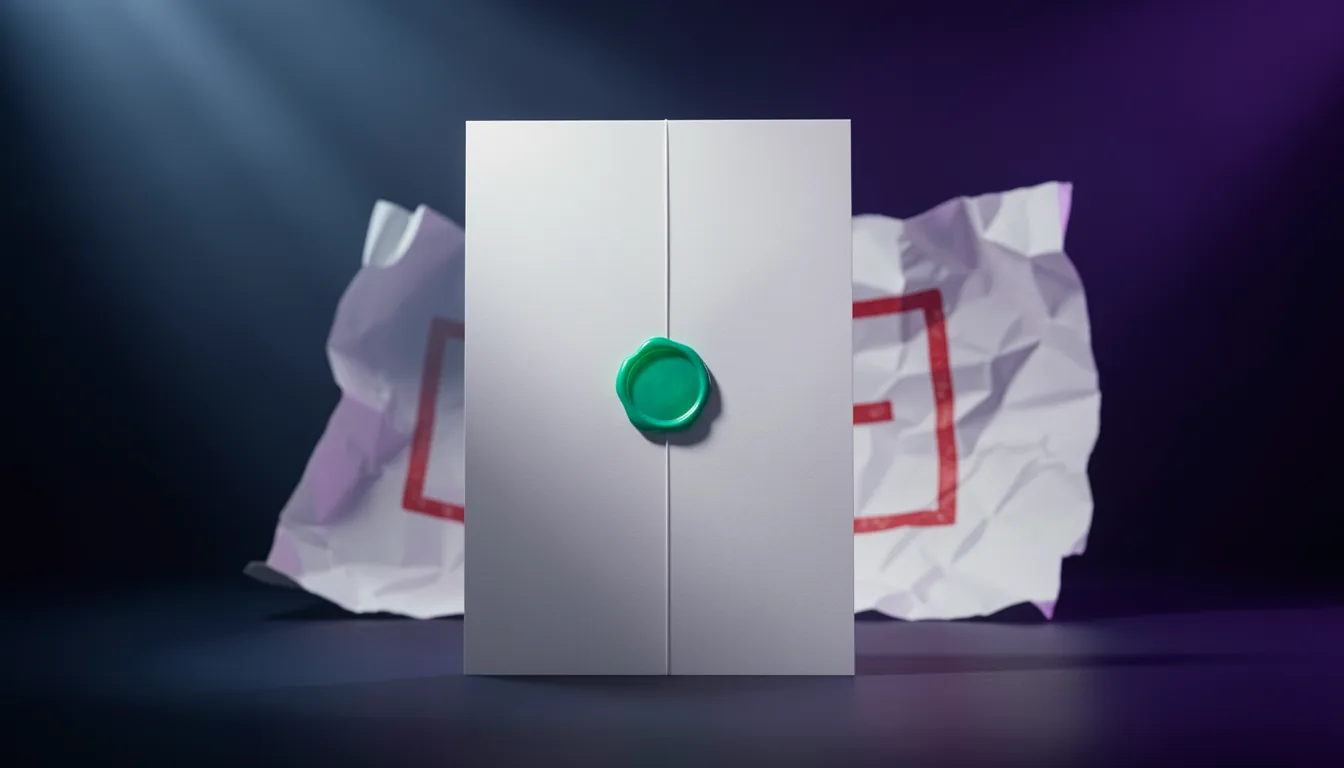
A crisp sealed original page standing in light, a crumpled, stamped copy behind it
The original, sealed.Whatever happens to the page later, your capture still says what it said, and shows any change.

Why it matters

The post was deleted. The price was changed. The terms were quietly edited. You still have the page.

✓ Signed the moment you captured it

A cropped screenshot is your word against theirs. SingleShot keeps the whole page, signed the moment you capture it, so anyone can check it's exactly what you saw, with or without SingleShot.

Picture this

  1. 11:42 pm

    The threats start.

    social.example/@anon_4471“You'll regret this. I know where you work.”✓ You click SingleShot. Signed, 11:42 pm.
  2. The next morning

    The account is gone. Every post deleted.

    social.example/@anon_4471This account doesn't exist.Nothing left online to show anyone.
  3. You

    Hand over the page as it was.

    social.example (11:42 pm).png“You'll regret this. I know where you work.”✓ Signed 11:42 pm · unchanged since

Now it's not your word against theirs.

An example: the account and the site are made up. What happens next depends on the platform, the police and the law where you are. If you are in danger, call your local emergency number.
A real case

“This decision should not be seen as endorsing the use of less-than-forensic-grade software to capture and preserve social media evidence.”

Supreme Court of British Columbia, R. v. Hamdan, 2017 BCSC 676, para. 113

The court was speaking about police screenshots, not about SingleShot. SingleShot isn't certified forensic software, and this isn't legal advice: it shows what a careful capture keeps, and anyone can check it.

Police had captured 85 Facebook posts as screenshots, the way most people still do. The pictures had banner artifacts over the text, posts left unexpanded, and no page source or metadata. The files were converted and copied from device to device.

So the court ruled the prosecution could not rely on the Canada Evidence Act's presumption of integrity (para. 81). It admitted the screenshots only as the best evidence left, because the pages themselves no longer existed (paras. 83–84), and it warned that if police methods did not improve, later decisions might find them unreasonable (para. 113).

  • The whole page, not a cropped picture: and the page itself saved as a file.
  • The address and the time recorded in every file, as it is captured.
  • A signature on every file, so any later change, even one pixel, shows.
  • A sealed original kept apart from the copy you work on (evidence mode).

Whether a court accepts a capture is for the court. (In that case the accused was found not guilty at trial, 2017 BCSC 1770.)

Real product footage · 31 seconds

The night it mattered.
The original that stayed.

Between its title cards, recorded live from SingleShot 1.4.0 on made-up pages (a social site and its deleted account), nothing sped up: the capture, its progress bar and the check are the real program running.
250+popular sites tested and tuned on, in our own tests
30+languages tested, right to left too
419automated stitching checks in our own tests, before every release
0 bytesof your pages sent to us. Ever.

Signed files

If anyone changes it,
it shows.

Every screenshot and saved page carries a digital signature, on by default. It is checked against every pixel of a picture and every byte of a page. Try it: change one pixel, by one shade nobody could see.

Unchanged since it was signed

Fingerprint of the whole picture: …

Standard signatures, checkable by anyone

PDFs carry a real PDF signature that Adobe Acrobat shows. Every file can be checked with OpenSSL, without SingleShot, or right here on this page.

A time nobody can backdate

Turn on independent timestamps and a public timestamp service (DigiCert) signs the time too, usually in well under a second. It receives a fingerprint of the signature, never your page.

Sign with your own certificate

Got a signing certificate on a smart card or USB token from your organisation? On Windows, SingleShot signs with it, and Acrobat shows your name. Your key and PIN never leave the card.

The record goes with it

Each seal records the address, the page title, when it was captured, and whether anything was cropped, blurred or redacted in the editor before saving.

Straight talk: a signature proves a file hasn't changed since it was saved, who signed it and when. It can't prove what a website showed, because a page can be changed in the browser before it's captured.

Evidence mode · included in every license

An original nobody touched.
A copy to work on.

For captures that may be needed as evidence. Switch on evidence mode and every capture is kept twice: the original, sealed in your evidence locker, and a working copy in a separate folder, for redacting and disclosing. Try it: capture a few pages, then change one character in a sealed package.

Locker intact

Locker · sealed originals

Downloads/SingleShot/Locker

Working · copies to redact

Downloads/SingleShot/Working

Real SHA-256 fingerprints, worked out by your browser.

Sealed before anyone can edit

The original is locked away before the editor even opens. If it can't be stored, nothing is saved: there is never an edit without its original.

Never mixed up

Originals and working copies live in different folders and share an item number: WORK-0007 belongs to ORIG-0007. Every redacted copy records the original it came from and what was done to it.

Checkable by anyone

Each package names the one sealed before it, so a missing one leaves a gap. Anyone can check a package with standard tools, without SingleShot, or right here on this page, and with an independent timestamp attached, nobody can backdate it.

Straight talk: Chrome lets an extension save only inside your Downloads folder, so the locker and the working folder live there. The seals prove a package hasn't changed since it was made; keeping the folder safe and backed up is still up to you. Evidence mode comes with every license, and with the free trial. SingleShot is a capture tool, not legal advice.

Real pages, really sealed

Not mock-ups: two public pages, captured in evidence mode, and what SingleShot wrote.

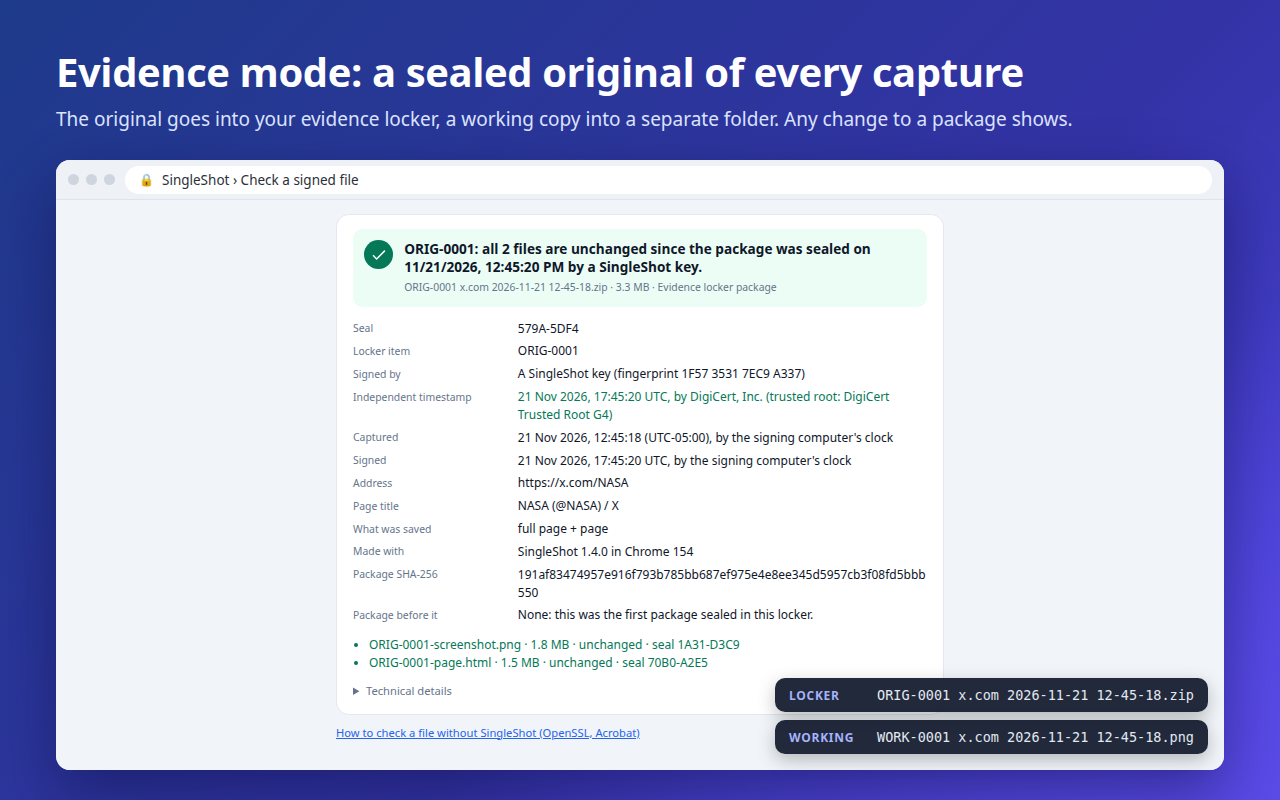
SingleShot's verify page confirming that an evidence locker package made from a public social media profile, and both files in it, are unchanged, with an independent timestamp from DigiCert
One click, one sealed package. A public profile's screenshot and saved page, checked: both unchanged, with a time DigiCert vouches for.
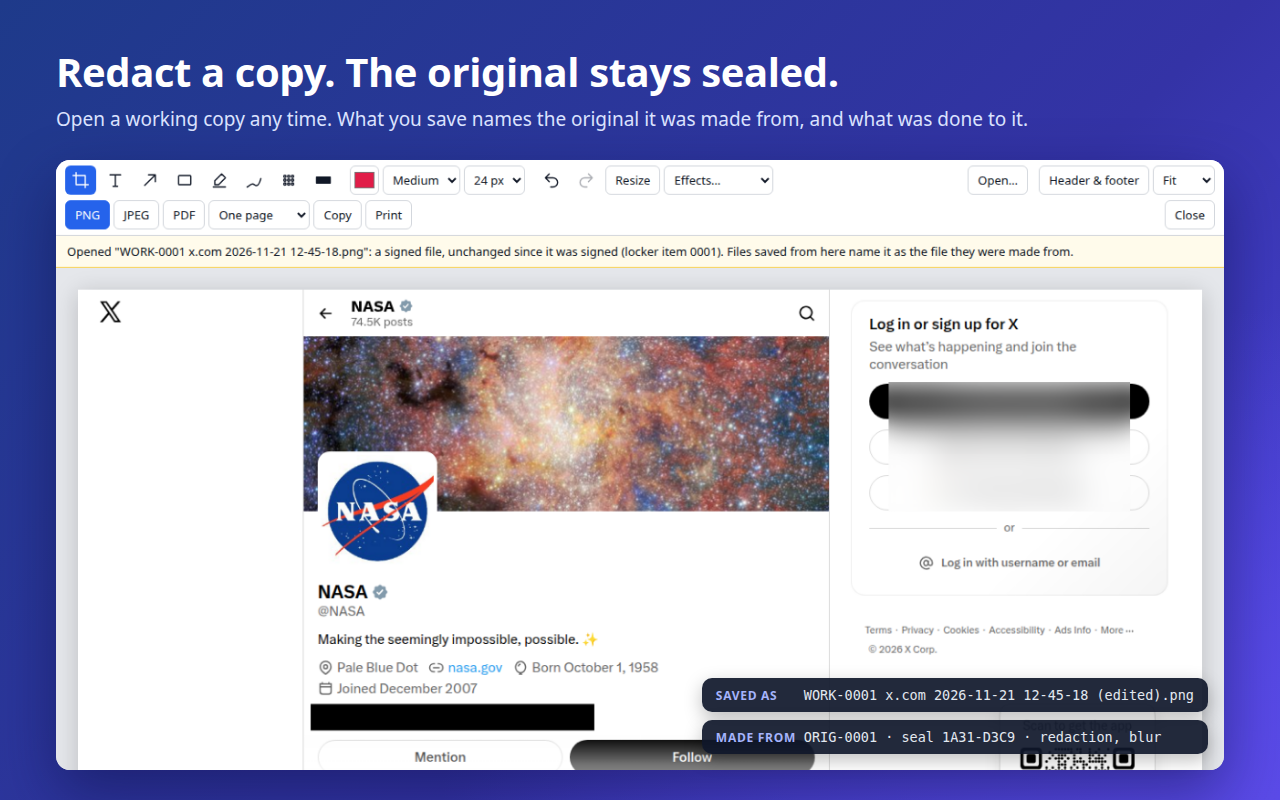
The SingleShot editor with a working copy opened from disk, a line blacked out and a panel blurred; the saved file names the locker item it was made from
Redact the copy, not the original. The working copy, opened later and redacted. The file it saves names ORIG-0001 and lists what was done.
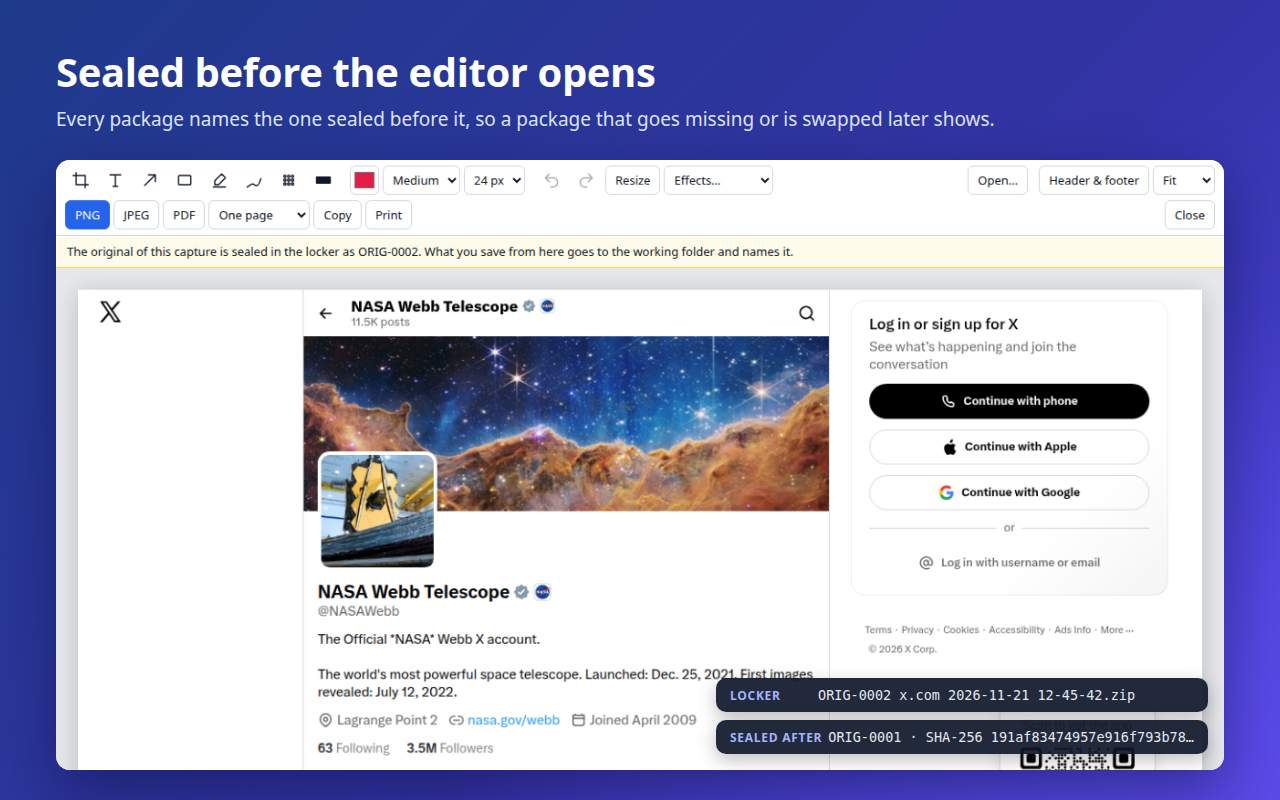
The SingleShot editor showing a capture of a second public profile, with a notice that its original is sealed in the locker as ORIG-0002, which names the package before it
Sealed before the editor opens. A second page becomes ORIG-0002, and its package records ORIG-0001's fingerprint.

Verify a file

Got a signed file?
Check it in a second.

Drop a PNG, JPEG, PDF, saved page or evidence locker package made by SingleShot. It's checked right here in your browser and never uploaded. Checking is free for everyone.

Download a signed sample (PNG, 1.9 MB)
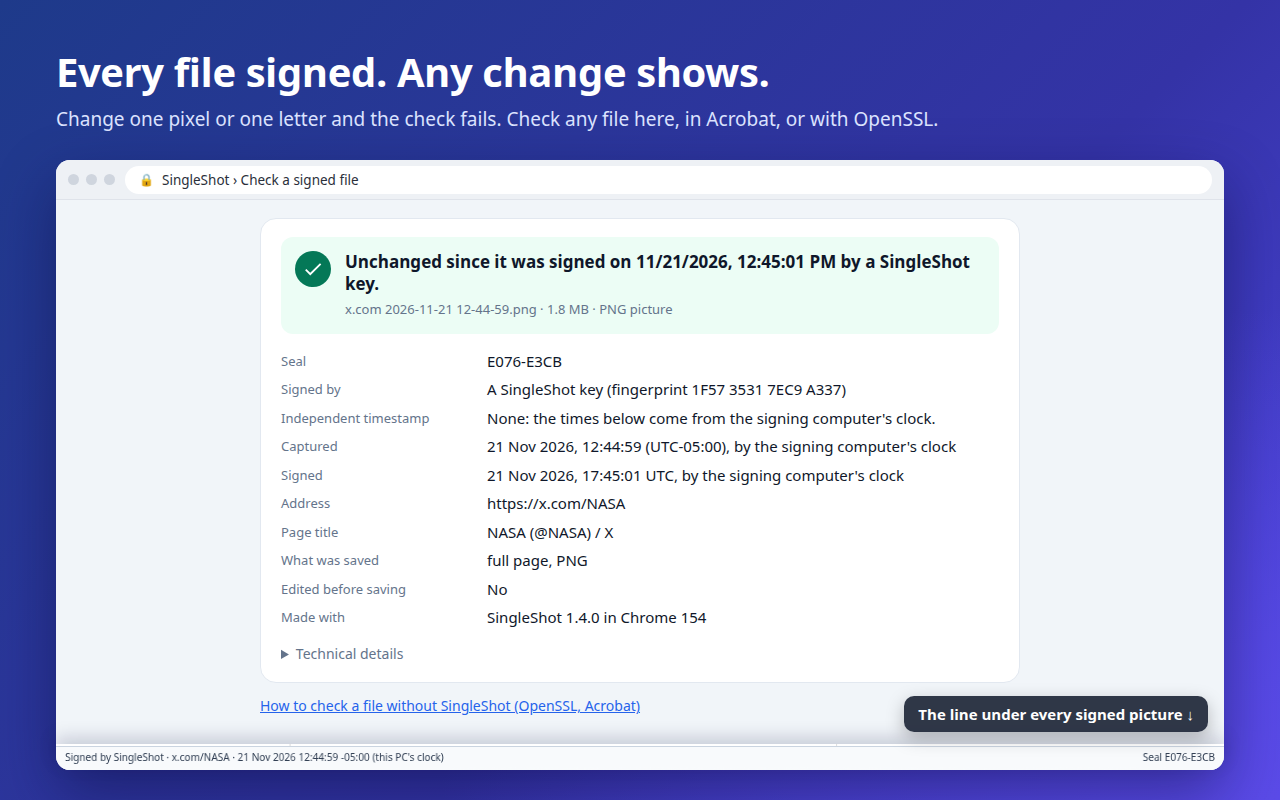
  1. Drop it in the box above. It passes: unchanged since it was signed, with the address and the time it was captured.
  2. Change one pixel in any image editor and save it.
  3. Drop it again. It fails, and the check shows the rows that changed.

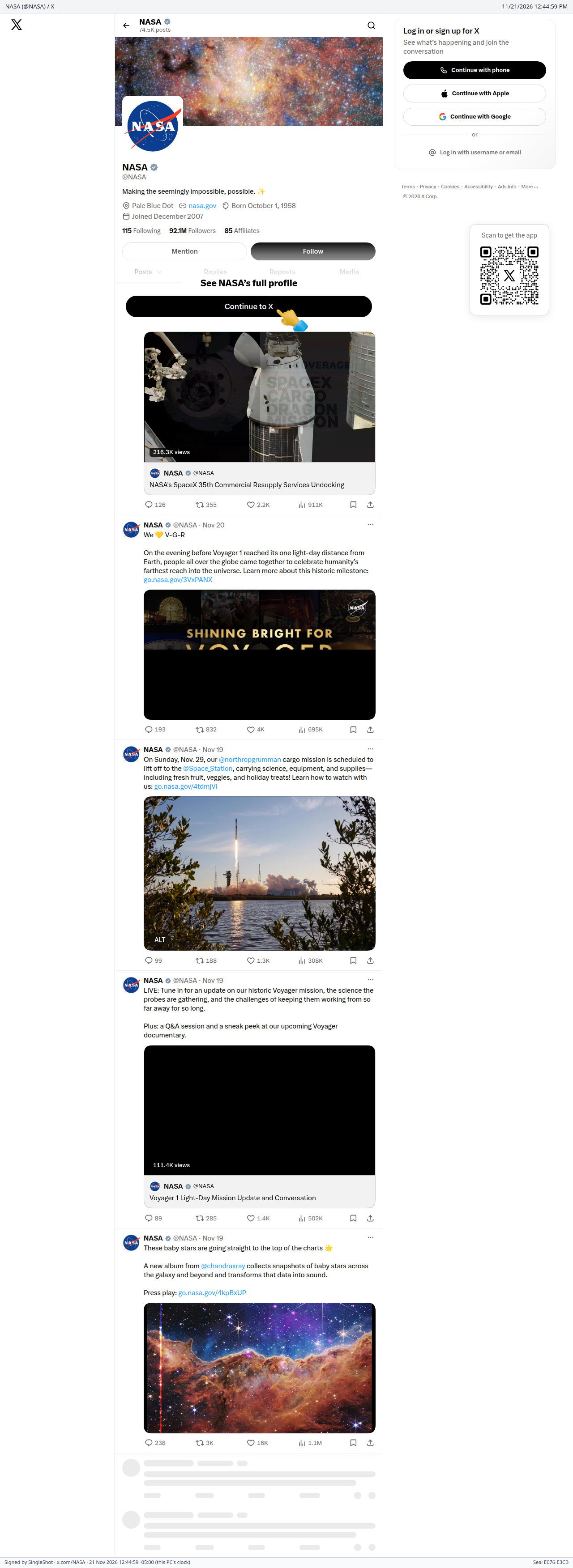
A real SingleShot 1.4.0 capture of a public page (x.com/NASA, signed out), made on 21 November 2026.

Who it's for

Everyday captures that just work.
Evidence anyone can check.

For everyday captures

The whole page, not a cropped piece of it

For designers, marketers, researchers, support teams and students: anyone who needs a page exactly as it looked.

  • Full page, visible area or a region you select, as PNG, JPEG or a PDF with clickable links
  • The page itself as one HTML file that opens offline in any browser
  • Sticky headers, cookie bars and chat buttons appear once, where they belong
  • An editor to crop, mark up, and blur or black out personal details
See the features →
For evidence

Captures someone may question later

For lawyers and paralegals, investigators, journalists, HR and compliance teams, and anyone documenting harassment.

  • A sealed original of every capture, kept apart from the copy you redact
  • An independent DigiCert timestamp on each item: a time nobody can backdate
  • A chained register: a package that goes missing leaves a gap that shows
  • Anyone can check a file, free, with or without SingleShot
See evidence mode →

One license covers both. Evidence mode is included, never an upgrade.

One click, two files

The picture and the page.
Together, every time.

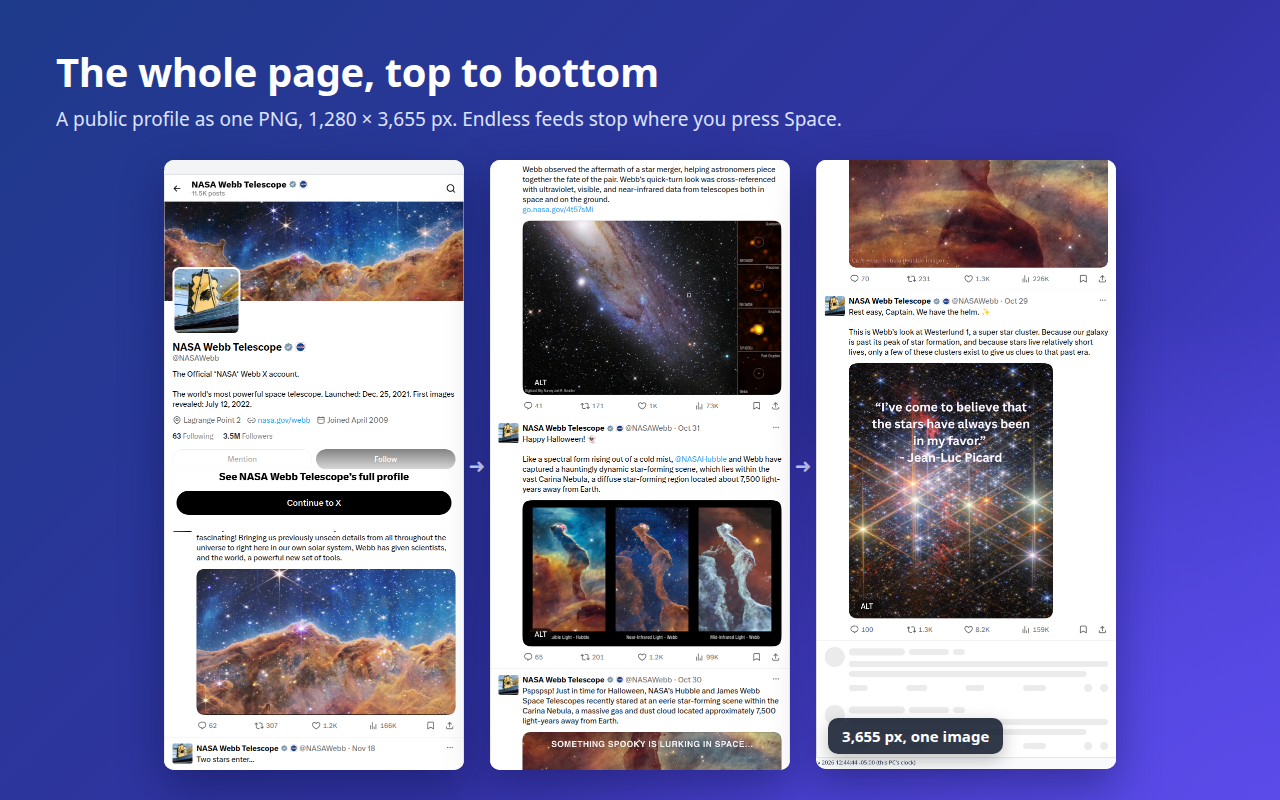
Press the SingleShot button and you get both: a screenshot of the entire page, and the page itself, saved as one HTML file with its styles, pictures and fonts inside. One shows exactly how it looked; the other keeps every word, link and table you can search and copy.

Full-page screenshot

Pixel-exact, top to bottom

SingleShot scrolls the page, waits for pictures to load, and stitches every screen together without a seam.

  • PNG, JPEG, or PDF with clickable links (one long page, or A4/Letter)
  • Sticky headers, cookie bars and chat buttons appear once, where they belong
  • Space stops a long capture and keeps what's done; Esc cancels
The page as one HTML file

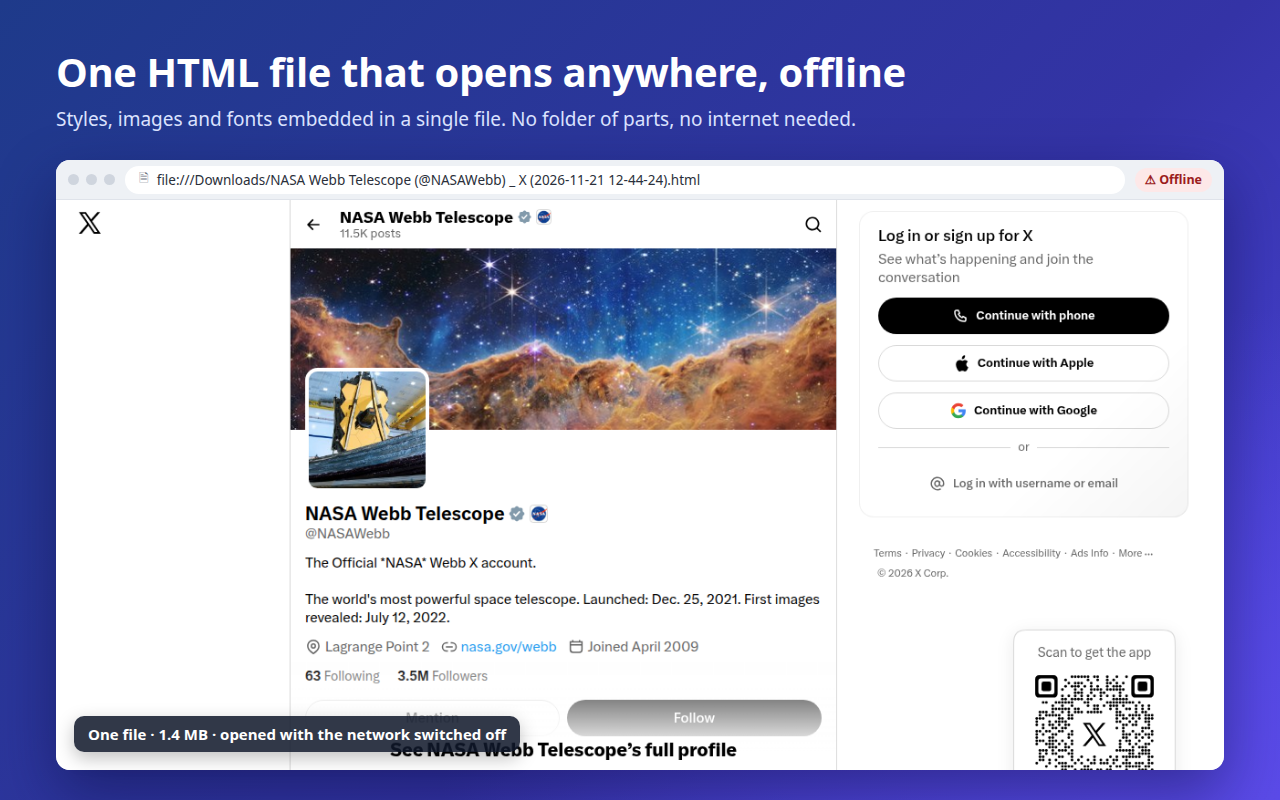
Opens anywhere, offline, years from now

Not a web archive you need software for: one ordinary .html file that any browser opens.

  • Looks exactly like the original: styles, fonts, frames and character sets kept
  • Only what the page uses is saved; pictures are never recompressed
  • The site's scripts are removed, so a saved page can't run anything

Up to 90% smaller pages

Only what the page actually uses is saved: in our tests a 6.9 MB page became 1.7 MB, or 0.7 MB as Compressed HTML. Still one file that opens by itself.

An editor that hides what it should

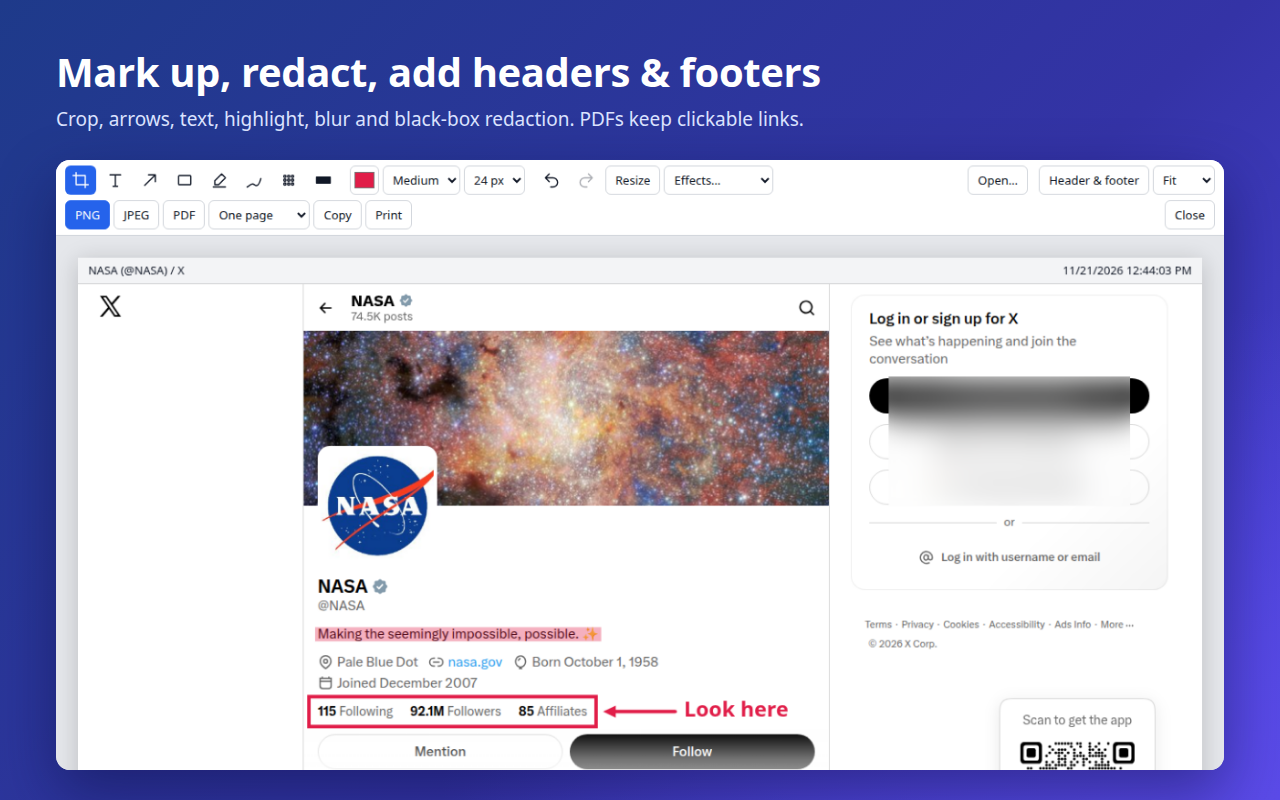
Crop, arrows, text, highlight, and blur or black-box redaction for personal details. Headers and footers with the address, date and page numbers. New: open any picture you saved and carry on where you left off.

Whole apps, not just feeds

On sites that scroll inside a panel, you get the complete window, header and side menu included, with the panel's full content below.

Every language, right to left too

Tested on sites in more than 30 languages, from Japanese to Arabic and Hindi, including decades-old text encodings.

Private by design

Everything happens on your computer. No accounts, no analytics, nothing uploaded. The only network use is the page's own pictures and fonts while it's being saved.

Pricing

Simple, honest pricing.
Everything included.

Try every feature free for 7 days, no card needed. Then choose a year, or pay once for life. Either way it's one payment: nothing renews by itself.

1 year

  • Every feature, evidence mode included
  • For 365 days from purchase, on all of your own computers
Coming soon
Best value

Lifetime

Costs about the same as three years of the yearly plan.
  • Every feature, evidence mode included
  • Never expires. Every future update included
Coming soon

14-day money-back guarantee

If SingleShot doesn't work for you, email us within 14 days of buying for a full refund. And you'll have had 7 days to try it first.

Every license includes

  • Full-page, visible-area and region screenshots
  • PNG, JPEG, and PDF with clickable links
  • The whole page as one HTML file, or compressed
  • The editor: crop, mark up, blur, black out
  • A digital signature on every file
  • Optional independent timestamps from DigiCert
  • Evidence mode: locker, working copies, register
  • Signing with your own certificate (Windows)
  • All of your own computers, through Chrome sync
  • Nine languages, and every update

The price is right here: no sales call, no quote, no per-seat fees. Checking signed files and locker packages is free for everyone, forever.

No subscription: nothing renews by itself Your key appears the moment you pay Sales tax handled at checkout

By buying a key you agree to the license terms, including the disclaimer and the limits on liability. Checkout is run by Stripe and sold through Link, Stripe's checkout service, which is the merchant of record and adds sales tax or VAT where it applies. Your card details never reach us. Your key appears on screen as soon as you have paid, and is emailed to you as well.

Install

Add SingleShot to Chrome. The 7-day trial starts at once, with every feature.

Paste your key

Click the SingleShot icon, then Enter key. Paste the whole key (it starts with SS1-).

Keep it

Your key stays active through updates and, with Chrome sync on, on your other computers.

Questions

Good questions.

Price and plans

Which plan should I choose?

Both include everything, evidence mode too. If you'll use SingleShot for more than three years, lifetime costs less, and it never expires. Not sure yet? Use the 7-day trial first: it has every feature and needs no card.

Is it a subscription?

No. Both plans are a single payment and nothing is ever charged again by itself. A yearly key stops unlocking new captures after 365 days, until you choose to buy another. Every file you made stays signed and checkable forever, with or without a key.

What happens after the trial?

SingleShot asks for a license key. Keys are checked on your computer; nothing is sent anywhere. Choose a year or lifetime: both include everything, evidence mode too. Checking signed files and locker packages stays free, with or without a key.

Trust and privacy

Is anything uploaded?

No. Screenshots and saved pages are made on your computer and saved to your Downloads folder. SingleShot has no accounts, no analytics and no servers of its own. When it saves a page, it downloads that page's own pictures, styles and fonts. If you turn on independent timestamps (evidence mode asks you to), the timestamp service receives a fingerprint of each signature, and nothing about the page.

What does a signature prove?

That the file is exactly as it was when it was saved, which key or certificate signed it, and when: by the computer's clock, or, with timestamps on, vouched for by DigiCert so nobody can backdate it. It doesn't prove what a website showed, because a page can be changed in the browser before it's captured. Edits made in SingleShot's editor are recorded in the signature.

How do I check a signed file?

Drop it on the checker above or in SingleShot (Options › Signed files). PDFs also show their signature in Adobe Acrobat and Reader. Anyone can check any signed file with OpenSSL, without SingleShot; the verify page shows how.

Will signed files still open everywhere?

Yes. The signature sits where viewers don't look: under a picture, inside a PDF's standard signature field, or after the end of a saved page. Keep the original file: posting a picture on social networks or chat apps re-encodes it, which removes the signature.

Evidence and the law

Will my captures hold up in court?

That's for the court to decide, and no tool can promise it. What SingleShot gives you is a record that supports authentication: a SHA-256 fingerprint and a signature on every file, an independent timestamp, the address and time of capture, a sealed original kept apart from the copy you redact, and a chain that shows if a package goes missing. Anyone can check all of it without SingleShot. Ask your lawyer how best to present it; this isn't legal advice.

What is evidence mode?

A switch in Options for captures that may be needed as evidence. While it is on, every capture is kept twice: the original, sealed in a package in your evidence locker and never written to again, and a working copy in a separate folder, which is the one to open, redact and disclose. The two carry different prefixes and the same item number. A file you save from the editor records which original it was made from. Every license includes it, and so does the free trial.

Can I sign with my own certificate?

Yes, on Windows. If your organisation issued you a signing certificate on a smart card, USB token or in the Windows certificate store, install the free SingleShot signing helper and choose the certificate in Options. Windows asks for your PIN as usual; SingleShot never sees your key or PIN.

Using it

What if a page doesn't capture well?

Some sites fight screenshots: endless feeds, or pages that rebuild themselves as you scroll. SingleShot was tuned on more than 250 popular sites and handles most of them, and on an endless feed Space stops the capture and keeps what's done. If it doesn't do the job for you, the 14-day money-back guarantee has you covered.

Which browsers?

Google Chrome, version 116 or newer, on Windows, macOS and Linux. Signing with your own certificate needs Windows.

Capture it once.
Trust it forever.

Free for 7 days. Then $9.99 a year, or $29.99 once: the launch price.

Every feature included · 14-day money-back guarantee · Nothing uploaded

Made by JawTech, an independent developer. Questions, ideas or a page that doesn't capture right: jawtech@jawtech.com.